You can check a demo here: https://tuanphan3.squarespace.com/hover-text-show-image-1?noredirect
Pass: abc

You can follow these steps to achieve effect: “hover text > show an image”
For 1 text
#1. Add this code to Code Injection > Footer. Replace Pixabay with your image url.
<img src="https://cdn.pixabay.com/photo/2016/12/03/15/44/fireworks-1880045_1280.jpg" class="hover-txt-img01"/>
<script src="https://ajax.googleapis.com/ajax/libs/jquery/3.7.0/jquery.min.js"></script>
<script>
jQuery(document).ready(function($){
  $('img.hover-txt-img01').appendTo('[href="#hover-txt-img01"]');
})
</script>
#2. Add this code to Custom CSS
img.hover-txt-img01 {
 display: none;
}
[href="#hover-txt-img01"] {
    color: black !important;
    position: relative;
}
[href="#hover-txt-img01"] img {
    position: absolute;
    width: 150px;
    bottom: 50px;
    right: 0;
    visibility: hidden;
  display: block;
}
[href="#hover-txt-img01"]:hover img {
    visibility: visible;
}
[href="#hover-txt-img01"] {
  text-decoration: none !important;
  background-image:none !important;
}
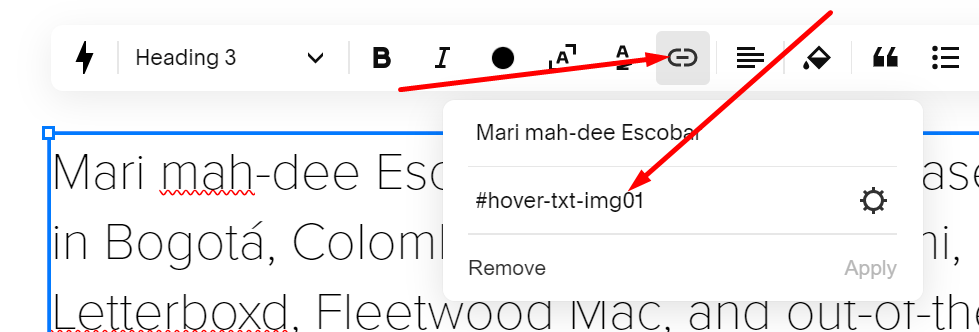
#3. Edit text > Add a link > Enter this format
#hover-txt-img01
For more text
You will need to enter links to all text, the format will be
#hover-txt-img01
#hover-txt-img02
#hover-txt-img03
with CSS code, use this shorter code for all text
[href*="#hover-txt-img"] {
  text-decoration: none !important;
  background-image:none !important;
}
img[class*="hover-txt-img"] {
 display: none;
}
[href*="#hover-txt-img"] {
    color: black !important;
    position: relative;
}

[href*="#hover-txt-img"] img {
    position: absolute;
    width: 150px;
    bottom: 50px;
    right: 0;
    visibility: hidden;
  display: block;
}

[href*="#hover-txt-img"]:hover img {
    visibility: visible;
}
with Code Injection, use this code
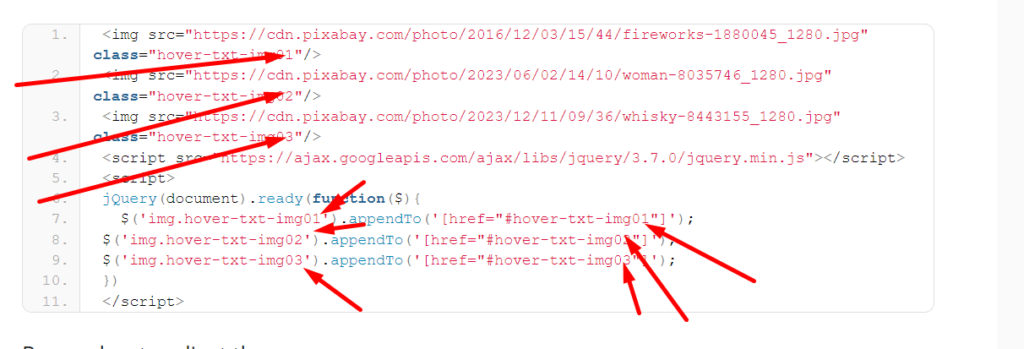
<img src="https://cdn.pixabay.com/photo/2016/12/03/15/44/fireworks-1880045_1280.jpg" class="hover-txt-img01"/>
<img src="https://cdn.pixabay.com/photo/2023/06/02/14/10/woman-8035746_1280.jpg" class="hover-txt-img02"/>
<img src="https://cdn.pixabay.com/photo/2023/12/11/09/36/whisky-8443155_1280.jpg" class="hover-txt-img03"/>
<script src="https://ajax.googleapis.com/ajax/libs/jquery/3.7.0/jquery.min.js"></script>
<script>
jQuery(document).ready(function($){
  $('img.hover-txt-img01').appendTo('[href="#hover-txt-img01"]');
$('img.hover-txt-img02').appendTo('[href="#hover-txt-img02"]');
$('img.hover-txt-img03').appendTo('[href="#hover-txt-img03"]');
})
</script>
Remember to adjust these