Description
- View Demo – Password: abc
#1. Install Code
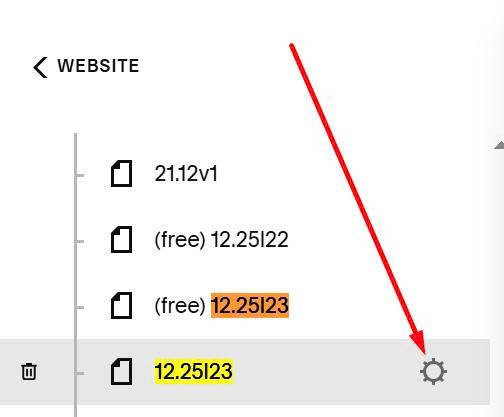
Hover on Page where you use Button > Click Gear icon
Paste this code
<style>
.button-block:has(.tp-label) {
a.sqs-block-button-element{
  position: relative;
  isolation: isolate;
  background: transparent !important;
  background-color: transparent !important;
  background-image: none !important;
  box-shadow: none !important;
  overflow: visible;
  --tp-arrow-right: 38px;
  --tp-shift: 10px;
  --tp-dur: 900ms;
}
a.sqs-block-button-element{border-color:var(--tp-c,currentColor)!important}a.sqs-block-button-element:hover,a.sqs-block-button-element:focus-visible{border-color:transparent!important;color:var(--tp-c,currentColor)!important;-webkit-text-fill-color:var(--tp-c,currentColor)}a.sqs-block-button-element .tp-label{position:relative;z-index:2;display:inline-block;transition:transform 260ms ease}a.sqs-block-button-element .tp-arrow{position:absolute;z-index:2;top:50%;right:var(--tp-arrow-right);transform:translateY(-50%) translateX(10px);opacity:0;transition:transform 260ms ease,opacity 260ms ease;line-height:1;pointer-events:none;color:var(--tp-c,currentColor)}a.sqs-block-button-element .tp-svg{position:absolute;inset:0;z-index:1;pointer-events:none;opacity:0}a.sqs-block-button-element .tp-svg svg{width:100%;height:100%;display:block}a.sqs-block-button-element .tp-svg path{fill:#fff0;vector-effect:non-scaling-stroke;shape-rendering:geometricPrecision;stroke-width:1;stroke-linejoin:round;stroke-linecap:square;stroke:var(--tp-c,currentColor);stroke-dasharray:var(--tp-len,600) var(--tp-len,600);stroke-dashoffset:calc(-1 * var(--tp-len, 600))}a.sqs-block-button-element:hover .tp-label,a.sqs-block-button-element:focus-visible .tp-label{transform:translateX(calc(-1 * var(--tp-shift)))}a.sqs-block-button-element:hover .tp-arrow,a.sqs-block-button-element:focus-visible .tp-arrow{opacity:1;transform:translateY(-50%) translateX(0)}a.sqs-block-button-element:hover .tp-svg,a.sqs-block-button-element:focus-visible .tp-svg{opacity:1}a.sqs-block-button-element:hover .tp-svg path,a.sqs-block-button-element:focus-visible .tp-svg path{animation:tpDash var(--tp-dur) linear forwards}a.sqs-block-button-element:not(:hover) .tp-svg path{animation:none;stroke-dashoffset:calc(-1 * var(--tp-len, 600))}}@keyframes tpDash{to{stroke-dashoffset:0}}
</style>
<script>
document.addEventListener("DOMContentLoaded",(function(){var e=document.querySelector(".button-block a.sqs-block-button-element");if(e&&!e.dataset.tpCtaReady2){e.dataset.tpCtaReady2="1";var t=getComputedStyle(e);e.style.setProperty("--tp-c",t.borderTopColor||t.color||"currentColor");var a=(e.textContent||"").trim();e.textContent="";var r=document.createElement("span");r.className="tp-label",r.textContent=a,e.appendChild(r);var n=document.createElement("span");n.className="tp-arrow",n.textContent="→",e.appendChild(n);var o=document.createElement("span");o.className="tp-svg",o.innerHTML='<svg aria-hidden="true" focusable="false" preserveAspectRatio="none"><path class="tp-anim"></path></svg>',e.appendChild(o);var s=o.querySelector("svg"),l=o.querySelector("path");d(),"ResizeObserver"in window?new ResizeObserver(d).observe(e):window.addEventListener("resize",d)}function d(){var t=e.getBoundingClientRect(),a=Math.max(1,t.width),r=Math.max(1,t.height);s.setAttribute("viewBox","0 0 "+a+" "+r);var n=.5,o=a-.5,d=r-.5,c=Math.max(0,(r-1)/2),i="M 0.5 "+r/2+" A "+c+" "+c+" 0 0 1 "+(n+c)+" 0.5 L "+(o-c)+" 0.5 A "+c+" "+c+" 0 0 1 "+o+" "+r/2+" A "+c+" "+c+" 0 0 1 "+(o-c)+" "+d+" L "+(n+c)+" "+d+" A "+c+" "+c+" 0 0 1 "+n+" "+r/2;l.setAttribute("d",i);try{var p=l.getTotalLength();e.style.setProperty("--tp-len",p),l.style.strokeDasharray=p+" "+p,l.style.strokeDashoffset=-p}catch(e){}}}));
</script>

#2. Customize
#2.1. To apply to All Buttons (Button Block), you can move code to Code Injection > Footer