Description
- adding search icon to header
- click search icon will open search popup
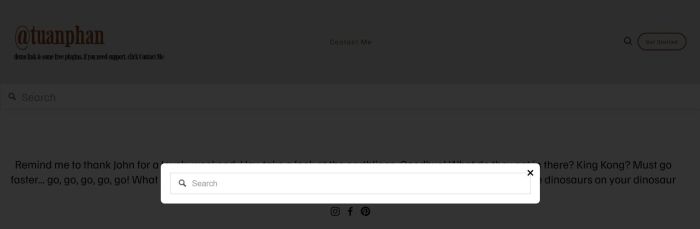
If you see these options complicated, you can also try this free code.
#Option 1. Use Search Block in a Not Linked Page
#1. First, create a Not Linked Page
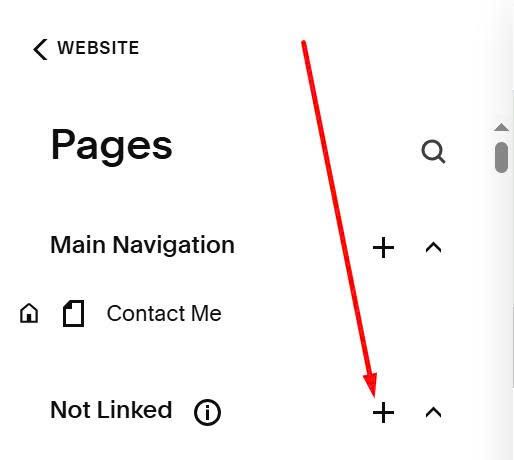
add search block there
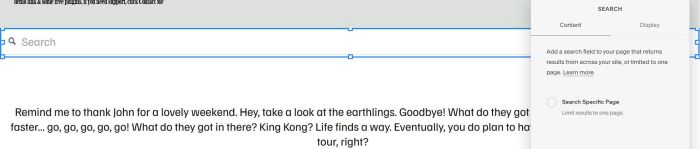
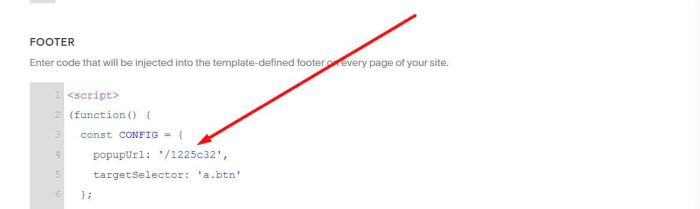
#2. Next, use this code to Code Injection > Footer
<script>
(function() {
const CONFIG = {
popupUrl: '/1225c32',
targetSelector: 'a.btn'
};
const searchIcon='\n <svg xmlns="http://www.w3.org/2000/svg" fill="none" viewBox="0 0 24 24" stroke-width="2" stroke="currentColor" style="width: 20px; height: 20px; cursor: pointer; vertical-align: middle;">\n <path stroke-linecap="round" stroke-linejoin="round" d="m21 21-5.197-5.197m0 0A7.5 7.5 0 1 0 5.196 5.196a7.5 7.5 0 0 0 10.607 10.607Z" />\n </svg>\n ';function createPopupOverlay(){const e=document.createElement("div");return e.id="wm-popup-overlay",e.style.cssText="\n position: fixed;\n top: 0;\n left: 0;\n width: 100%;\n height: 100%;\n background: rgba(0, 0, 0, 0.8);\n z-index: 9998;\n display: none;\n opacity: 0;\n transition: opacity 0.3s ease;\n ",e.addEventListener("click",(()=>closePopup())),document.body.appendChild(e),e}function createPopupContainer(){const e=document.createElement("div");e.id="wm-popup-container",e.style.cssText="\n position: fixed;\n top: 50%;\n left: 50%;\n transform: translate(-50%, -50%) scale(0.9);\n width: 90%;\n max-width: 800px;\n max-height: 90vh;\n background: white;\n z-index: 9999;\n display: none;\n opacity: 0;\n transition: all 0.3s ease;\n overflow-y: auto;\n border-radius: 8px;\n ";const n=document.createElement("button");n.innerHTML="×",n.style.cssText="\n position: absolute;\n top: 0px;\n right: 0px;\n background: none;\n border: none;\n font-size: 30px;\n cursor: pointer;\n z-index: 10000;\n width: 40px;\n height: 40px;\n display: flex;\n align-items: center;\n justify-content: center;\n ",n.addEventListener("click",(e=>{e.stopPropagation(),closePopup()}));const t=document.createElement("div");return t.id="wm-popup-content",t.style.cssText="padding: 20px;",e.appendChild(n),e.appendChild(t),document.body.appendChild(e),e}async function loadPopupContent(e){try{const n=await fetch(e);if(!n.ok)throw new Error(`HTTP error! status: ${n.status}`);const t=await n.text(),o=new DOMParser,i=o.parseFromString(t,"text/html").querySelector("main#page");return i?i.innerHTML:""}catch(e){return"<p>Error loading content</p>"}}async function openPopup(){let e=document.getElementById("wm-popup-overlay"),n=document.getElementById("wm-popup-container");e||(e=createPopupOverlay()),n||(n=createPopupContainer());const t=document.getElementById("wm-popup-content");t.innerHTML='<p style="text-align: center; padding: 40px;">Loading...</p>',e.style.display="block",n.style.display="block",requestAnimationFrame((()=>{e.style.opacity="1",n.style.opacity="1",n.style.transform="translate(-50%, -50%) scale(1)"}));const o=await loadPopupContent(CONFIG.popupUrl);t.innerHTML=o,reinitializeScripts(t)}function closePopup(){const e=document.getElementById("wm-popup-overlay"),n=document.getElementById("wm-popup-container");e&&n&&(e.style.opacity="0",n.style.opacity="0",n.style.transform="translate(-50%, -50%) scale(0.9)",setTimeout((()=>{e.style.display="none",n.style.display="none"}),300))}function reinitializeScripts(e){e.querySelectorAll("script").forEach((e=>{const n=document.createElement("script");e.src?n.src=e.src:n.textContent=e.textContent,e.parentNode.replaceChild(n,e)})),window.Squarespace&&Squarespace.onInitialize(window.Y,(()=>{window.Y.use((()=>{}))}))}function addSearchIcons(){document.querySelectorAll(CONFIG.targetSelector).forEach((e=>{if(!e.previousElementSibling?.classList.contains("wm-search-icon")){const n=document.createElement("span");n.className="wm-search-icon",n.innerHTML=searchIcon,n.style.cssText="display: inline-block; margin-right: 10px;",n.addEventListener("click",(e=>{e.preventDefault(),e.stopPropagation(),openPopup()})),e.parentNode.insertBefore(n,e)}}))}document.addEventListener("keydown",(e=>{"Escape"===e.key&&closePopup()})),"loading"===document.readyState?document.addEventListener("DOMContentLoaded",addSearchIcons):addSearchIcons();
})();
</script>
<style>
.fluid-engine:has(.search-block) {row-gap: 0px;--row-height-scaling-factor: 0;}
</style>
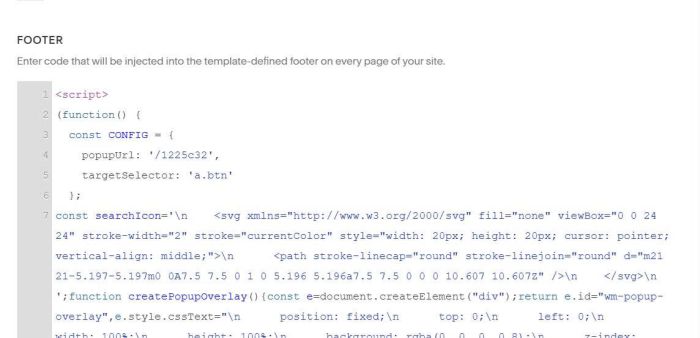
#3. Remember to update Not Linked Page URL
#Option 2. Use tool for Search, and code to add search to Header
#1. First you need to create a Search with this tool (choose free version)
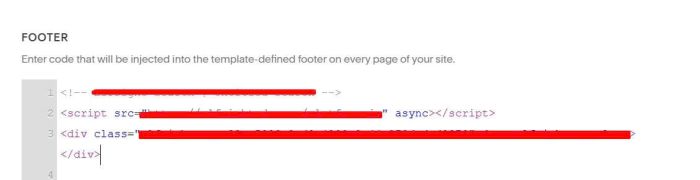
#2. Next, you can add embed code to Code Injection > Footer. Something like this
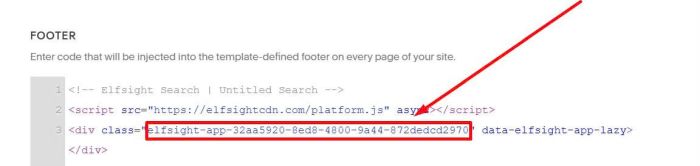
#3. Next, find Search ID
In embed code, you will see an ID like this
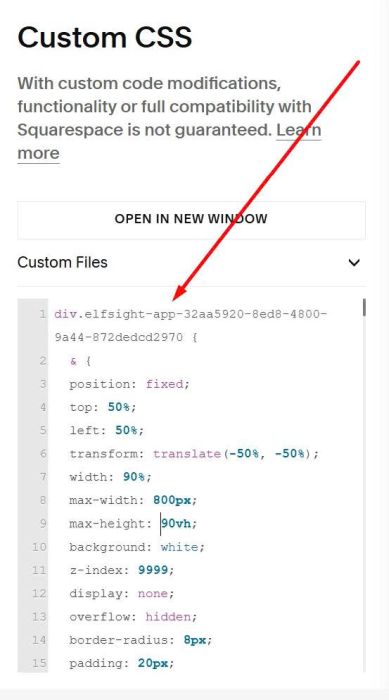
#4. Use this code to Custom CSS. Remember to change Search ID
div.elfsight-app-32aa5920-8ed8-4800-9a44-872dedcd2970 {
  & {
  position: fixed;
  top: 50%;
  left: 50%;
  transform: translate(-50%, -50%);
  width: 90%;
  max-width: 800px;
  max-height: 90vh;
  background: white;
  z-index: 9999;
  display: none;
  overflow: hidden;
  border-radius: 8px;
  padding: 20px;
  box-shadow: 0 4px 20px rgba(0, 0, 0, 0.3);
}
&.tp-active {
  display: block;
}
div[class*="Inner"] {
    width: 100%;
}}

#tp-popup-overlay {
  position: fixed;
  top: 0;
  left: 0;
  width: 100%;
  height: 100%;
  background: rgba(0, 0, 0, 0.8);
  z-index: 9998;
  display: none;
}
#tp-popup-overlay.tp-active {
  display: block;
}
#tp-popup-close {
  position: fixed;
  top: 10px;
  left: 10px;
  background: white;
  border: none;
  font-size: 30px;
  cursor: pointer;
  z-index: 10000;
  width: 40px;
  height: 40px;
  display: none;
  align-items: center;
  justify-content: center;
  border-radius: 50%;
  box-shadow: 0 2px 10px rgba(0, 0, 0, 0.3);
}
#tp-popup-close.tp-active {
  display: flex;
}
.tp-search-icon {
  display: inline-block;
  margin-right: 10px;
}
.tp-search-icon svg {
  width: 20px;
  height: 20px;
  cursor: pointer;
  vertical-align: middle;
}
#5. Use this code under Search embed code in Footer
<script>
(function() {
const CONFIG = {
contentSelector: 'div.elfsight-app-32aa5920-8ed8-4800-9a44-872dedcd2970',
targetSelector: 'a.btn'
};
const searchIcon='\n <svg xmlns="http://www.w3.org/2000/svg" fill="none" viewBox="0 0 24 24" stroke-width="2" stroke="currentColor">\n <path stroke-linecap="round" stroke-linejoin="round" d="m21 21-5.197-5.197m0 0A7.5 7.5 0 1 0 5.196 5.196a7.5 7.5 0 0 0 10.607 10.607Z" />\n </svg>\n ';function createOverlay(){if(document.getElementById("tp-popup-overlay"))return;const e=document.createElement("div");e.id="tp-popup-overlay",e.addEventListener("click",closePopup),document.body.appendChild(e)}function createCloseButton(){if(document.getElementById("tp-popup-close"))return;const e=document.createElement("button");e.id="tp-popup-close",e.innerHTML="×",e.addEventListener("click",closePopup),document.body.appendChild(e)}function openPopup(){const e=document.querySelector(CONFIG.contentSelector);document.getElementById("tp-popup-overlay"),document.getElementById("tp-popup-close");e&&(createOverlay(),createCloseButton(),e.classList.add("tp-active"),document.getElementById("tp-popup-overlay").classList.add("tp-active"),document.getElementById("tp-popup-close").classList.add("tp-active"),document.body.style.overflow="hidden")}function closePopup(){const e=document.querySelector(CONFIG.contentSelector),t=document.getElementById("tp-popup-overlay"),o=document.getElementById("tp-popup-close");e&&e.classList.remove("tp-active"),t&&t.classList.remove("tp-active"),o&&o.classList.remove("tp-active"),document.body.style.overflow=""}function addSearchIcons(){document.querySelectorAll(CONFIG.targetSelector).forEach((e=>{if(!e.previousElementSibling?.classList.contains("tp-search-icon")){const t=document.createElement("span");t.className="tp-search-icon",t.innerHTML=searchIcon,t.addEventListener("click",(e=>{e.preventDefault(),e.stopPropagation(),openPopup()})),e.parentNode.insertBefore(t,e)}}))}document.addEventListener("keydown",(e=>{"Escape"===e.key&&closePopup()})),"loading"===document.readyState?document.addEventListener("DOMContentLoaded",addSearchIcons):addSearchIcons();
})();
</script>
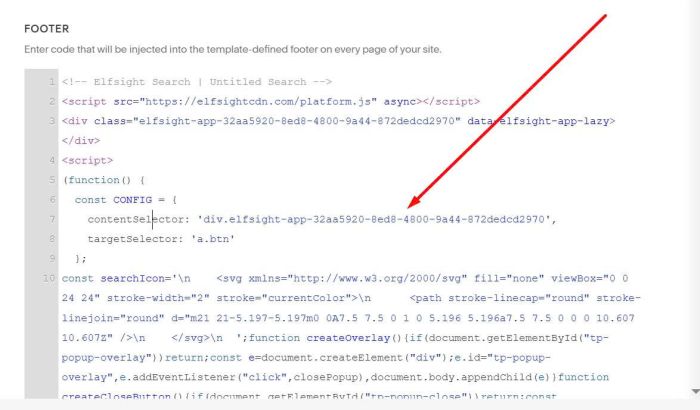
Remember to change Search ID