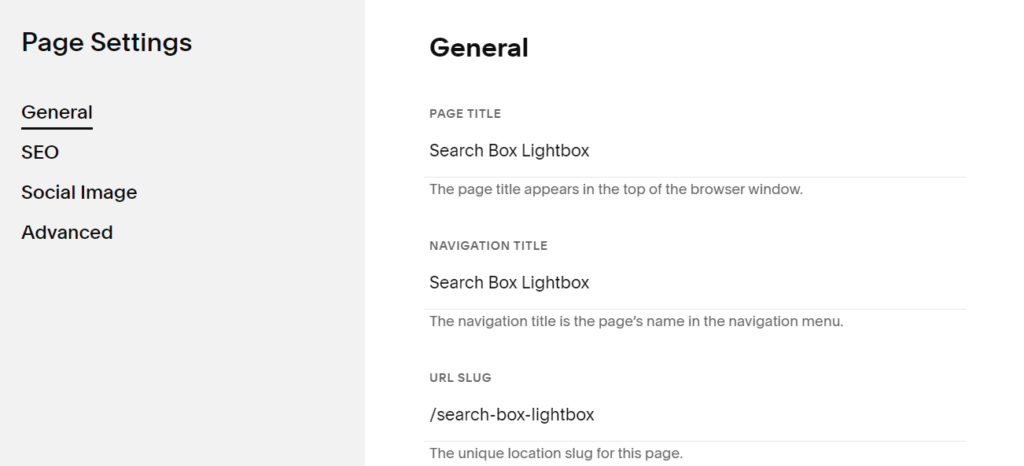
See screenshot for detail.

#1. First, add a page in Not Linked
- Name: Search Box Lightbox
- URL: /search-box-lightbox
#2. Next, install Section Loader Plugin
You will have some code like this in Code Injection Header

and Footer

#3. Use this code to Code Injection Footer, under Section Loader Plugin code
<script src="https://ajax.googleapis.com/ajax/libs/jquery/3.7.0/jquery.min.js"></script>
<script>
$(document).ready(function() {
$('<img src="https://assets.squarespace.com/universal/images-v6/icons/icon-searchqueries-20-dark.png" class="tp-search-icon"/>').insertBefore('.header-actions-action.header-actions-action--cart');
   setTimeout( function() {
        $(".tp-search-icon").click(function() {
            $('[data-wm-plugin]').toggleClass('show-search');
        });
    }, 3000);
});
</script>
#4. Add this to Custom CSS
div[data-wm-plugin] {
    position: fixed;
    top: 0;
    left: 0;
    width: 100%;
    z-index: 9999999;
    background-color: white;
    box-shadow: 3px 5px 14px 0px rgba(0,0,0,0.2);
    padding: 20px;
    transform: translateY(-150%);
   transition: all 0.5s;
}
  div[data-wm-plugin].show-search {
  	transform: translateY(150px);
    transition: all 0.5s;
  }
  .tp-search-icon {
  	cursor: pointer;
  }