Description: expand more text on click

(after)

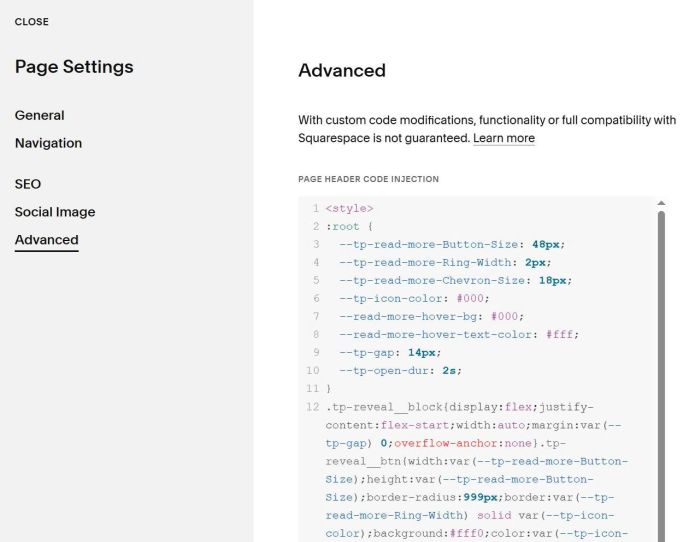
#1. Install Code
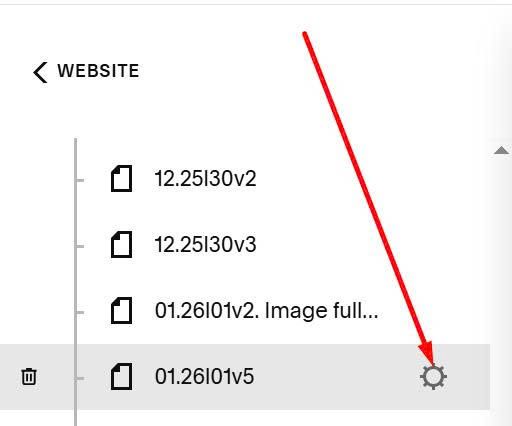
First, hover on Page where you want to run this effect > Click Gear icon
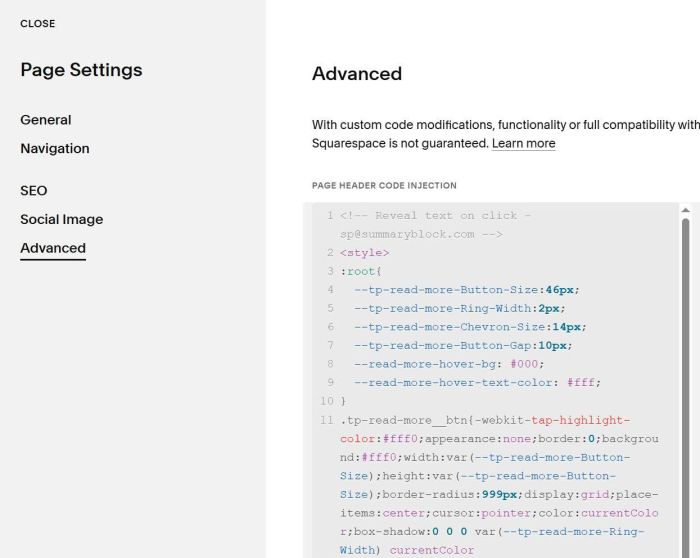
Next, click Advanced > Paste this code
<!-- Reveal text on click - [email protected] -->
<style>
:root{
  --tp-read-more-Button-Size:46px;
  --tp-read-more-Ring-Width:2px;
  --tp-read-more-Chevron-Size:14px;
  --tp-read-more-Button-Gap:10px;
  --read-more-hover-bg: #000;
  --read-more-hover-text-color: #fff;
}
.tp-read-more__btn{-webkit-tap-highlight-color:#fff0;appearance:none;border:0;background:#fff0;width:var(--tp-read-more-Button-Size);height:var(--tp-read-more-Button-Size);border-radius:999px;display:grid;place-items:center;cursor:pointer;color:currentColor;box-shadow:0 0 0 var(--tp-read-more-Ring-Width) currentColor inset;transition:background 220ms ease,color 220ms ease;margin-top:var(--tp-read-more-Button-Gap);padding:0}.tp-read-more__btn:hover{background:var(--read-more-hover-bg);color:var(--read-more-hover-text-color);box-shadow:0 0 0 var(--tp-read-more-Ring-Width) revert}.tp-read-more__icon{width:var(--tp-read-more-Chevron-Size);height:var(--tp-read-more-Chevron-Size);display:block;transform-origin:center;transition:transform 820ms cubic-bezier(.18,.9,.18,1)}.tp-read-more__btn.tp-is-open .tp-read-more__icon{transform:rotate(180deg)}@media (prefers-reduced-motion:reduce){.tp-read-more__btn,.tp-read-more__icon{transition:none!important}}.tp-read-more__clip{overflow:hidden;contain:layout paint;will-change:height}
</style>
<script>
!function(){const t=820,e="cubic-bezier(.18,.9,.18,1)";function n(n){const i=n.closest(".sqs-html-content");if(!i)return!1;if("1"===i.dataset.tpReadMoreReady)return!0;const s=(n.textContent||"").trim();if(-1===s.indexOf("###"))return!1;const r=s.split("###"),a=(r[0]||"").trim(),o=r.slice(1).join("###").trim();if(!a||!o)return!1;const l=(a+" "+o).replace(/\s+/g," ").trim(),c=(a.replace(/\s+$/,"")+" ...").replace(/\s+/g," ").trim(),d=document.createElement("div");d.className="tp-read-more__clip",n.parentNode.insertBefore(d,n),d.appendChild(n);const h=document.createElement("button");h.type="button",h.className="tp-read-more__btn",h.setAttribute("aria-expanded","false"),h.setAttribute("aria-label","Expand text"),h.innerHTML='\n      <svg class="tp-read-more__icon" viewBox="0 0 448 512" aria-hidden="true">\n        <path fill="currentColor"\n          d="M207.029 381.476L12.686 187.132c-9.373-9.373-9.373-24.569 \n          0-33.941l22.667-22.667c9.357-9.357 24.522-9.375 \n          33.901-.04L224 284.505l154.745-154.02c9.379-9.335 \n          24.544-9.317 33.901.04l22.667 22.667c9.373 9.373 \n          9.373 24.569 0 33.941L240.971 381.476c-9.373 \n          9.372-24.569 9.372-33.942 0z"/>\n      </svg>\n    ',d.insertAdjacentElement("afterend",h);let u=0,p=!1,g=null;function f(n,i,s){g&&g.cancel(),d.style.height=n+"px",g=d.animate([{height:n+"px"},{height:i+"px"}],{duration:t,easing:e,fill:"forwards"}),g.onfinish=()=>{g=null,d.style.height=i+"px",s&&s()}}return h.addEventListener("click",(()=>{h.classList.contains("tp-is-open")?function(){if(p)return;p=!0;const t=d.getBoundingClientRect().height;n.textContent=l,d.style.height=t+"px",h.classList.remove("tp-is-open"),h.setAttribute("aria-expanded","false"),f(t,u,(()=>{n.textContent=c,d.style.height="auto",u=d.scrollHeight,d.style.height=u+"px",p=!1}))}():function(){if(p)return;p=!0;const t=d.getBoundingClientRect().height;n.textContent=l,d.style.height="auto";const e=d.scrollHeight;d.style.height=t+"px",h.classList.add("tp-is-open"),h.setAttribute("aria-expanded","true"),f(t,e,(()=>{d.style.height="auto",p=!1}))}()})),n.textContent=c,d.style.height="auto",u=d.scrollHeight,d.style.height=u+"px",i.dataset.tpReadMoreReady="1",!0}function i(){document.querySelectorAll(".sqs-html-content p").forEach(n)}document.addEventListener("DOMContentLoaded",i),window.addEventListener("load",i),document.addEventListener("sqs:page-view",i)}();
</script>
Next, edit Text Block > Add symbol: ###
###

#2. Customize
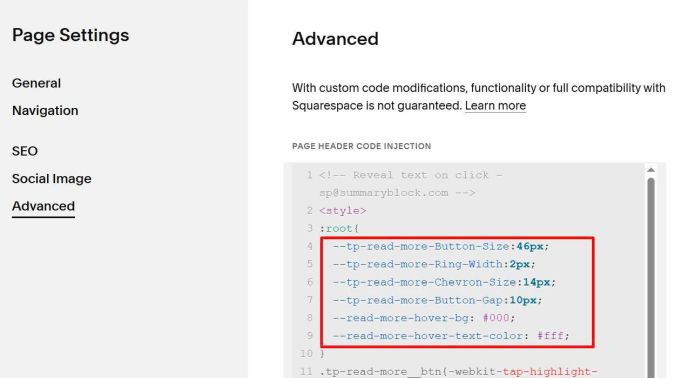
All style options in Line 04 to Line 09
--tp-read-more-Button-Size:46px;
--tp-read-more-Ring-Width:2px;
--tp-read-more-Chevron-Size:14px;
--tp-read-more-Button-Gap:10px;
--read-more-hover-bg: #000;
--read-more-hover-text-color: #fff;
#2.1. (Update version)
If you place ### in new line like this
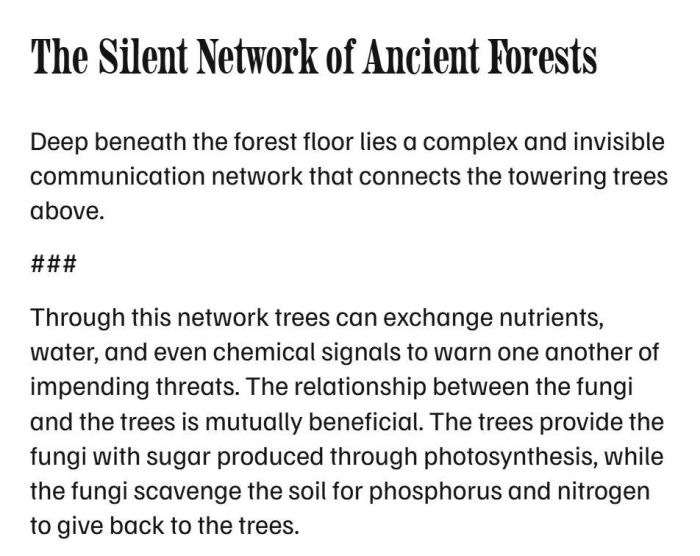
Result like this
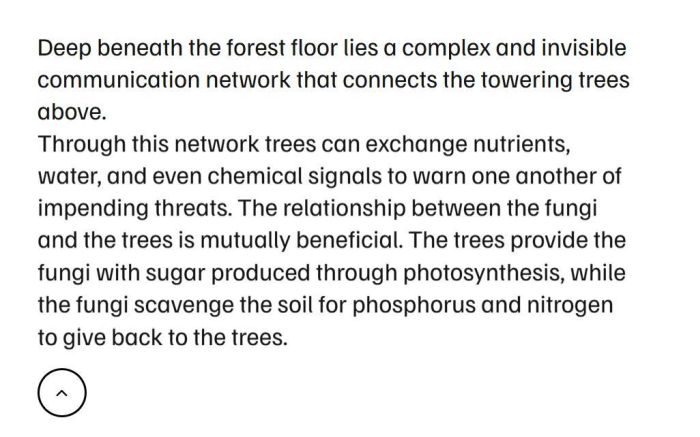
You can use this new code to Page Header Injection
<style>
:root {
  --tp-read-more-Button-Size: 48px;
  --tp-read-more-Ring-Width: 2px;
  --tp-read-more-Chevron-Size: 18px;
  --tp-icon-color: #000;
  --read-more-hover-bg: #000;
  --read-more-hover-text-color: #fff;
  --tp-gap: 14px;
  --tp-open-dur: 2s;
}
.tp-reveal__block{display:flex;justify-content:flex-start;width:auto;margin:var(--tp-gap) 0;overflow-anchor:none}.tp-reveal__btn{width:var(--tp-read-more-Button-Size);height:var(--tp-read-more-Button-Size);border-radius:999px;border:var(--tp-read-more-Ring-Width) solid var(--tp-icon-color);background:#fff0;color:var(--tp-icon-color);display:inline-flex;align-items:center;justify-content:center;cursor:pointer;transition:background .2s ease,color .2s ease;-webkit-tap-highlight-color:#fff0;touch-action:manipulation}.tp-reveal__btn:hover{background:var(--read-more-hover-bg);color:var(--read-more-hover-text-color)}.tp-reveal__btn:focus{outline:none}.tp-reveal__chev{width:var(--tp-read-more-Chevron-Size);height:var(--tp-read-more-Chevron-Size);transition:transform 0.22s cubic-bezier(.18,.9,.18,1)}.tp-reveal__btn[aria-expanded="true"] .tp-reveal__chev{transform:rotate(180deg)}.tp-reveal__panel{display:inline-grid;grid-template-rows:0fr;opacity:0;transform:translateY(-6px);transition:grid-template-rows var(--tp-open-dur) cubic-bezier(.18,.9,.18,1),opacity var(--tp-open-dur) cubic-bezier(.18,.9,.18,1),transform var(--tp-open-dur) cubic-bezier(.18,.9,.18,1);will-change:grid-template-rows,opacity,transform;overflow-anchor:none}.tp-reveal__panel.is-open{grid-template-rows:1fr;opacity:1;transform:translateY(0)}.tp-reveal__panel-inner{overflow:hidden;min-height:0;display:inline;padding:0;line-height:inherit}.tp-reveal__dots{display:inline-block;width:3ch;opacity:1;vertical-align:baseline;line-height:1;transition:opacity calc(var(--tp-open-dur) * .35) cubic-bezier(.18,.9,.18,1);overflow-anchor:none}.tp-reveal__dots.is-hidden{opacity:0}.tp-reveal-host{white-space:normal!important;overflow-anchor:none}@media (prefers-reduced-motion:reduce){.tp-reveal__panel,.tp-reveal__chev,.tp-reveal__dots{transition:none!important}}
</style>
<script>
!function(){var e="###",t="data-tp-reveal-done";function n(e){return(e||"").replace(/[\r\n\t]+/g," ").replace(/\u00A0/g," ").replace(/\s{2,}/g," ").trim()}function r(t){return t&&"P"===t.tagName&&n(t.textContent)===e}function a(e){return!(!e||"P"!==e.tagName)&&(!e.querySelector("img,svg,iframe,video")&&!n(e.textContent))}function l(e){for(var t=document.createTreeWalker(e,NodeFilter.SHOW_TEXT);t.nextNode();){var n=t.currentNode,r=n.nodeValue,a=r.replace(/[\r\n\t]+/g," ").replace(/\u00A0/g," ").replace(/\s{2,}/g," ");a!==r&&(n.nodeValue=a)}}function o(e){l(e);for(var t=document.createDocumentFragment();e.firstChild;)t.appendChild(e.firstChild);for(var n=t.querySelectorAll?t.querySelectorAll("br"):[],r=n.length-1;r>=0;r--){var a=n[r];a.parentNode.insertBefore(document.createTextNode(" "),a),a.parentNode.removeChild(a)}for(var o=document.createTreeWalker(t,NodeFilter.SHOW_TEXT);o.nextNode();){var i=o.currentNode;i.nodeValue=i.nodeValue.replace(/[\r\n\t]+/g," ").replace(/\u00A0/g," ").replace(/\s{2,}/g," "),i.nodeValue.trim()||(i.nodeValue="")}for(var d=t.firstChild;d;){var c=d.nextSibling;3!==d.nodeType||d.nodeValue||t.removeChild(d),d=c}return t}function i(e){if("1"!==e.getAttribute(t)){for(;e.previousElementSibling&&a(e.previousElementSibling);)e.previousElementSibling.remove();for(;e.nextElementSibling&&a(e.nextElementSibling);)e.nextElementSibling.remove();var n=e.previousElementSibling,i=e.nextElementSibling;if(n&&"P"===n.tagName&&i){l(n),n.classList.add("tp-reveal-host");var d,c=document.createElement("div");c.className="tp-reveal__block",c.appendChild(((d=document.createElement("button")).className="tp-reveal__btn",d.type="button",d.setAttribute("aria-expanded","false"),d.innerHTML='<svg class="tp-reveal__chev" viewBox="0 0 24 24"><path d="M6 9l6 6 6-6" fill="none" stroke="currentColor" stroke-width="2" stroke-linecap="round" stroke-linejoin="round"/></svg>',d));for(var u,s,p=((u=document.createElement("span")).className="tp-reveal__dots",u.textContent="...",u),m=((s=document.createElement("span")).className="tp-reveal__panel",s.innerHTML='<span class="tp-reveal__panel-inner"></span>',s),v=m.firstChild,f=document.createDocumentFragment(),g=i;g&&("P"!==g.tagName||!r(g));){var h=g.nextElementSibling;if("P"===g.tagName){var b=o(g);b.childNodes.length&&(f.lastChild&&f.appendChild(document.createTextNode(" ")),f.appendChild(b)),g.remove()}g=h}v.appendChild(f),n.appendChild(document.createTextNode(" ")),n.appendChild(p),n.appendChild(document.createTextNode(" ")),n.appendChild(m),e.parentNode.insertBefore(c,e.nextSibling),e.setAttribute(t,"1"),e.remove(),function(e,t,n){var r=e.querySelector(".tp-reveal__btn");r.addEventListener("pointerdown",(function(e){"mouse"===e.pointerType&&e.preventDefault()})),r.addEventListener("mousedown",(function(e){e.preventDefault()})),r.addEventListener("click",(function(){var e=!("true"===r.getAttribute("aria-expanded"));r.setAttribute("aria-expanded",e?"true":"false"),t.classList.toggle("is-open",e),n.classList.toggle("is-hidden",e)}))}(c,m,p)}}}function d(e){l(e),[].slice.call(e.querySelectorAll("p")).forEach((function(e){a(e)&&e.remove()})),[].slice.call(e.querySelectorAll("p")).forEach((function(e){r(e)&&i(e)}))}function c(){var e=document.querySelectorAll(".sqs-html-content");e.length||(e=[document.body]);var t=0;!function n(){[].forEach.call(e,d),++t<80&&requestAnimationFrame(n)}(),new MutationObserver((function(){[].forEach.call(e,d)})).observe(document.documentElement,{childList:!0,subtree:!0})}"loading"===document.readyState?document.addEventListener("DOMContentLoaded",c):c()}();
</script>